Lunch coverage planner for MSP teams

Lunch Breaks Shouldn't Break Your Service

Lunchtable shows you exactly when each person is free to go on lunch and whether every support tier stays covered. Set it up in two minutes. Share one link with the team.
Create your workspace No account needed. Free to use.
🔒 lunchtable.app/atlas-support-desk
Live
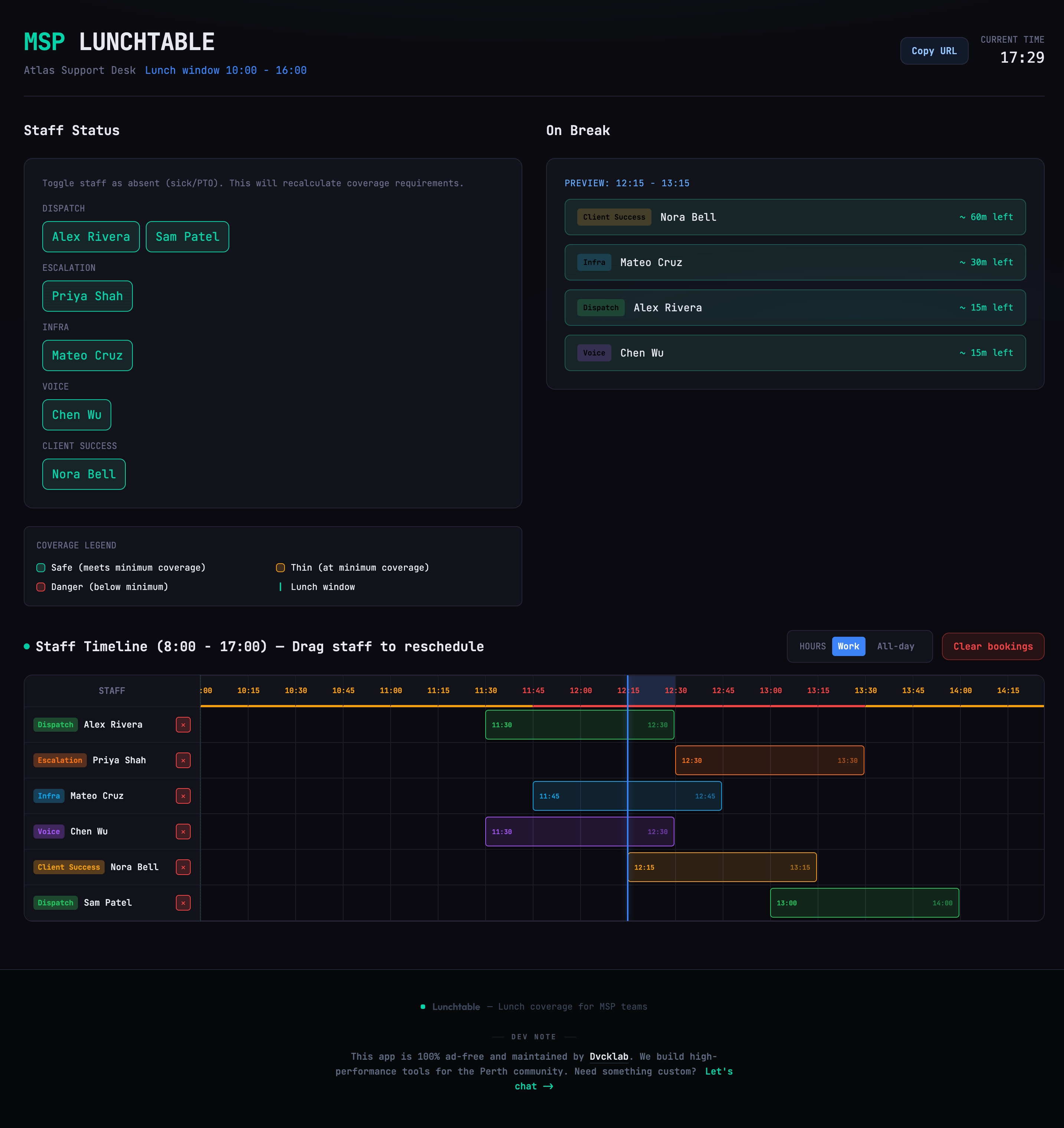
MSP Lunchtable workspace showing staff timeline with drag-and-drop lunch scheduling, coverage legend, and role-based staff status panel
The problem

Lunch breaks shouldn't be a coverage gamble

If you manage an MSP help desk, you know the feeling. Two L1s go to lunch at the same time. The queue backs up. An L2 escalation comes in and nobody's there to catch it. You find out after the fact, when a client is already frustrated.

Overlapping breaks

Without a shared view, people book the same slot. Two from the same tier go at once, and the SLA timer keeps running.

Manual tracking in Slack or sheets

Messages get buried. Spreadsheets go stale. Whoever's "managing" lunch ends up doing it in their head, and that person eventually takes a vacation.

No escalation path at noon

If every L2 is eating at the same time, there's nobody to escalate to. Tickets sit. Clients notice. You hear about it in the monthly review.

How it works

Three steps. One shared link.

1

Create a workspace

Name your team, define roles (L1, L2, L3), set minimum coverage per tier, and add staff. Takes about two minutes.

2

Share the link

Every workspace gets a unique URL. Drop it in your team channel. Staff open it and drag themselves onto a lunch slot.

3

See coverage in real time

The timeline updates live. Green means safe. Yellow means thin. Red means a tier has no coverage. Adjust before it becomes a client issue.

Why teams switch

Built for the way MSP help desks actually run

01

Tier-aware coverage

Set minimum headcount per role. The board tracks L1, L2, and L3 availability separately, so you always have an escalation path.

02

Drag-and-drop scheduling

Staff pick their own slots by dragging onto the timeline. No back-and-forth messages. No manager bottleneck. The coverage indicator updates instantly.

03

Day-type staffing

Monday and Friday run differently than midweek. Lunchtable adjusts staffing expectations by day so coverage targets always reflect reality.

04

Absence tracking built in

Mark someone as out and the coverage math recalculates immediately. You'll see the impact before it hits the queue.

05

Zero setup overhead

No accounts. No installs. No vendor procurement. Create a workspace, get a link, share it. Your team is booking slots in under five minutes.

06

Live sync across the team

The board polls every few seconds. When someone books or moves a slot, everyone sees the change. No stale views, no version conflicts.

System architecture

How it works under the hood

The app is a single SSR deployment. React renders the planning board, Astro serves the HTML, and API routes coordinate bookings and absences in PostgreSQL.

Client

Browser + React UI

Drag-and-drop timeline, role filters, and coverage badges render in React. The board polls to keep every viewer in sync.

App server

Astro SSR

Serves the landing page and workspace views with server-side rendering for fast initial load times.

API

Bookings + Absences

Astro API routes accept slot updates, validate coverage rules, and return the latest schedule state.

Data

PostgreSQL

Stores bookings and absences. Coverage calculations are derived from the latest rows on every refresh.

Data flow

Browser → SSR render → API read/write → PostgreSQL

Live updates

The board polls every few seconds, so every viewer sees the same schedule without manual refresh.

Coverage logic

Tier minimums and day-type staffing rules are applied on every timeline refresh.

Why not the alternatives

MSP Lunchtable beats bloated suites and brittle spreadsheets

You can force MSP coverage into enterprise scheduling tools or manage it in Sheets. Both routes add friction. Lunchtable stays focused on coverage, lunch windows, and escalation readiness.

Option
Cost & complexity
MSP coverage fit
Ease of use
Option Expensive/bloated schedulers Generic workforce suites
Cost & complexity High cost, long setup, unused modules
MSP coverage fit Roles are generic; tier coverage is bolted on
Ease of use Steep learning curve, heavy workflows
Option Google Sheets / Excel Free, customizable
Cost & complexity Low cost, but high manual maintenance
MSP coverage fit No live coverage enforcement, manual checks
Ease of use Formulas, tabs, and human policing
Option MSP Lunchtable Purpose-built for coverage
Cost & complexity No bloat, no training, launch in minutes
MSP coverage fit L1/L2/L3 coverage and lunch windows are native
Ease of use Single link, drag-and-drop, live status
Coverage status at a glance

Safe

Coverage exceeds minimum for all tiers

Thin

Exactly at minimum. One absence away from a gap.

Gap

Below minimum. No escalation path. Rearrange before it costs you.

Questions

Common questions

Do I need to create an account?

No. You create a workspace directly. You can optionally set a passcode so only your team can access it, but there's no sign-up flow or email required.

What happens if coverage drops to red?

The timeline shows the gap visually in red. Anyone viewing the board can see the problem and move their slot. The tool doesn't block bookings, it makes the risk visible so the team self-corrects.

Can I customize the lunch window and work hours?

Yes. Workspace admins can set custom work hours, lunch window, roles, minimum coverage per role, and staff assignments. All configurable through the admin panel.

Is this just for MSPs?

It was designed for MSP help desks, but any team that needs minimum coverage during breaks can use it. Customer support teams, NOC operations, retail shifts - if you have tiers and coverage requirements, it works.

How does live sync work?

The board refreshes every few seconds. When someone books, moves, or cancels a slot, every browser viewing the workspace picks up the change automatically. No manual refresh needed.

Your team deserves lunch without the coverage anxiety

Set up a workspace, share the link, and let the board handle the coordination. Two minutes to start.

Create your workspace Free. No account. No credit card.